Showing posts with label Computer Programming. Show all posts

Free Computer Programming Unit Study

This is a four week, secular, free computer science unit study perfect for kids in grades 3rd-5th which can be adapted to work for older or younger children. It uses the Scratch programming language to develop foundational programming skills. The lessons are video based followed by experimentation at the computer. After kids complete the Scratch portion of this unit study, they can continue creating more complicated games and animations using Scratch, progress into programming with Xcode used for Apple products, or learn to program with Javascript which is another programming language.

Week 1: Scratch Basics

Scratch is free tool designed by the Massachusetts Institute of Technology for kids to learn the basics of computer programming. When programming with scratch kids drag commands they want to use into a programming window. The tool eliminates the need to know syntax and instead places the focus on the bigger picture of program structure.

Watch Scratch Basics, the first in a series of videos created to introduce kids to scratch. Then open the tool and play around.

Here is one example of what kids can come up with. In Fly-O-Rama the player sees if the shark can catch the bee. The shark moves when the q key is pressed. The bee moves when the arrow keys are pressed and the space bar, m and b make the characters talk.

This program is an animation of a dancer in action.

The following keyboard keys control the dancer.
a - next stage and hide dancer
b - show dancer
c - dancer raises arm
d - dancer jumps into the splits
e - dancer kicks leg into the air and catches it
f - dancer does an aerial
arrow keys - move dancer

To see these programs go to the Scratch website.
Fly-o-Rama
Garde


Week 2: Sensing and Events

Watch Lesson 2 - Sensing and Events, and then play with the software to try out what you learn. Be sure to import, and modify existing graphics as well as use different functions to control the characters.

Here is a sample program called Movies and Monsters. The following keys on the keyboard control the monsters.

arrow keys - move monster #1
j, k, l and i - move monster #2
g and z - make monster #3 appear and disappear
a, q and space bar - sounds


Here is another sample program called octopus who chases a star around the screen. The star is set to move to a new random spot on the screen every second. The octopus always points toward the star and tries to touch it. If he does, the octopus opens his mouth and the star disappears.

Week 3: Video Games

Continue watching videos in the tutorial series and writing programs in scratch. Try to create if statements which are tied to keyboard strokes.

Here is an example called Falling Ball Competition. It's a two person game. When the falling balls reach the corresponding balls at the bottom of the screen the competitors press a key on the keyboard to earn a point. If the keyboard key is pressed before or after the balls are in contact the competitor loses a point. The player with the highest score after 48 balls fall is the winner. The pink balls are controlled with the keys a,s,d and f. The purple balls are controlled with the keys h,j,k and l. To try the game click on the Falling Ball Competition link above.


Week 4: Degrees in a Circle

Watch Lesson 4 - Drawing and then play with Scratch. In this lesson create circles with simple code which included inputting the number of degrees and steps to go around a circle. For example, if the code in the program says take 10 steps around in 36 degree intervals a complete circle would be drawn since 36x10 = 360 (number of degrees in a circle). Create unique and interesting geometric designs on the computer.


Week 5: Xcode

If your child has enjoyed programming with Scratch but needs a new challenge consider introducing Xcode. Xcode is an Apple programming tool used to create Apps. The best way to access Xcode is directly through an Apple computer. Look through the Ray Wenderlich Library of Tutorials for Computer Programmers for current tutorials on Xcode and other computer programming tutorials. Some tutorials are free and some require payment to become active. Here is one free tutorial to help get you started.


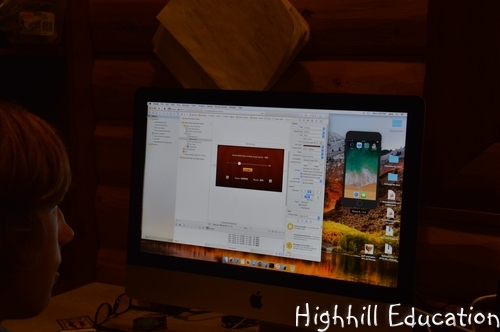
One simple app that kids can create is called the "Hit Me" app. Basically it is a simple game where the person playing is given a number and asked to move a slider bar labeled 1-100 closest to the number given. In the photo below, you can see the game being simulated on a phone within the computer screen.


Once the app is complete it can be transferred to an actual iPhone.

Week 6: Javascript

If your child has enjoyed programming with Scratch an alternative to learning to program with Xcode is to try programming in Javascript. Get a copy of the book Javascript for Kids. In the first chapter the author explains that in reality, computers are actually very dumb. They can after all, do only what humans tell them to do.

Javascript for Kids starts with the very basics and builds from there.  In discussing variables, the first main topic, the difference between numbers, strings and booleans is explained. Short program examples are given and the kids can type them right into the browser to see how they work. Chapters contain challenge questions designed to get kids creating their own programs using the tools they learned.

Coding for Kids - Snake Game in Python

My son created a snake computer game using the Python language.

Since my son was about two years old I have predicted that he will become some type of engineer. Now I think he may become a computer programmer. He is very interested in programming and will work for hours trying to make his games work.

Last week he decided to learn a little about the Python language. Since he has never worked with this language he found a tutorial to get him started.

Following the steps in this video he was able to create a simple game where a snake moves around the screen to eat a piece of cake (another square dot). This was not a complicated activity since it only took him one afternoon, but a great way to learn a little about another programming language.

For me, the program was cool, but my son taking the initiative was the success story. I really like the fact that this was a self-directed activity. This entire project was completely my son's idea. Somehow he got the idea to create a game using Python, and then searched youtube to find a resource to get started.

When kids have basic skills of reading, writing and math they are capable of learning more about anything which interests them. One of my main goals for this school year is to teach my kids how to learn. I want them to become more independent, able to find resources on their own and more passionate about their learning. This is definitely a step in that direction.

How to learn Xcode

My son created his first app using Xcode.

Although we are not following an unschooling approach, this year the kids have had a lot of say over their education. Because their activities need to be approved, the philosophy is a little more in-line with Montessori if that philosophy were used for older children.

When my son said he wanted to learn Xcode, I was apprehensive because he was entering a territory of information completely beyond my knowledge base. Despite this fact, I was excited because he was following his interests. Since my husband is a computer programmer, he has been my son's primary support system in this endeavor. However, he himself doesn't know how to program using Xcode, so the material my son is learning is also beyond his scope of knowledge.


After a week of persistent effort to get Xcode up and running, my son began creating his first app. Thank goodness we have the INTERNET and TUTORIALS. Because of my husband's experiences, he was able to point my son to the Ray Wenderlich Library of Tutorials for Computer Programmers. Some tutorials are free and some require payment to become active, but my son was able to find a free tutorial to help him get started.

The app my son created is called the "Hit Me" app. Basically it is a simple game where the person playing is given a number and asked to move a slider bar labeled 1-100 closest to the number given. In the photo below, you can see the game being simulated on a phone within the computer screen.

Although the app is mostly finished, it is not quite complete because he is having difficulty getting it transferred to an actual iPhone. It seems lots of developers have had this issue and he is currently searching the internet for different solutions that worked to help others overcome the problem.


I know app development is not for me because these types of issues would frustrate me too much, but these are precisely the types of challenges my son and husband thrive on once they are conquered. It is great to watch my son persevere, research and be self-motivated. He is so proud of his incremental accomplishments and we are both proud of him.

It's amazing how you can help kids to gain knowledge without being familiar with the material yourself.

Montessori in Middle Homeschool - Xcode

Last week I mentioned we are implementing a Montessori inspired approach to middle school. After giving the kids a long list of research topics mixed with hands-on activities and small projects to choose from, my son exclaimed that he wanted to learn to program in Xcode, an Apple programming tool used to create Apps. Well that wasn't on the list, but an acceptable topic none-the-less.

After completing three days of school he unfortunately hadn't gotten too far with Xcode, but had been very persistent and learned a lot. His main issue was getting access to Xcode which was a real challenge since he has a Windows computer. In what must be an effort to increase sales of hardware, Apple makes it quite difficult to run Xcode on a non-Apple machine.


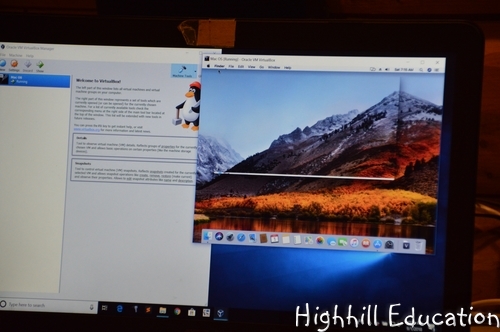
He actually did get Xcode running but it runs slow on his Windows machine. To get it going, he figured out how to create a virtual Apple desktop on his PC. This was quite a process which involved lots of trial and error, and an unwanted bit-coin mining virus. In the end, Xcode will run on the virtual desktop, but runs too slow to be an effective solution. Next he investigated remote logging-into my husband's Apple machine to see if he could run Xcode that way. Well it tuned out that the best way to access Xcode was directly through an Apple computer. Now he is in the research and tutorial phase of learning Xcode. I can't wait to see where this leads him.

Most Montessori programs are designed for pre-school through elementary. What I like about the Montessori philosophy is that students are motivated by selecting their own activities. However, un-like an unschooling approach where the student has complete control over what they study, I like the way the Montessori approach sets-up the classroom and effectively gives students acceptable choices. I see our approach to education as Montessori inspired because the choices are given by the adult but selected by the student. It tends to be quite hands-on and often involves learning life skills. Since middle and high school students are capable of reading, a list of acceptable topics and activities for this age works well. Also, unlike the elementary years where students are learning the basics and have necessary manipulatives readily available, for this age, resources are gathered and research completed based on what the student selects to pursue.

So far this approach to education is accomplishing a few of my educational goals for the year including teaching the kids to persevere, making them more independent learners and getting them excited about school. They have been motivated to read and research because they have selected what they want to study. Both my husband and I assist them and try to offer suggestions when we see them getting stuck or progress slowing.

Although this project has taken the majority of his time, he has a few other smaller projects he is working on. I will explain more next week.

Programming for Kids

My son is learning to program using Javascript.

After many years learning the basics of computer programming with Scratch, my son is learning his first programming language. Javascript. His last project on Scratch was a Mrs. PacMan game. After working many weeks on his design, which included downloading and reading the code of a similar game, he was ready to move on. Well, actually he wasn't. He wanted to make his game perfect which is a common trait of a computer programmer and engineer, but we told he he was ready to level up, or graduate if you will, to bigger and better things.

We found the key in the book Javascript for Kids. After reading the first chapter I was hooked. The author explained that in reality, computers were actually very dumb. They can after all, do only what humans have told them to do. It made perfect sense and made me laugh.


Then we moved on. This book is perfect because it starts with the very basics and builds from there.  In discussing variables, the first main topic, the difference between numbers, strings and booleans is explained. Short program examples are given and the kids can type them right into the browser to see how it works. Chapters also contain challenge questions designed to get kids creating their own programs using the tools they learned.

We covered about a chapter per week and by the end my son was on a roll.


Cenozoic Era Creatures

Evolution Unit Study

Lesson 8: Cenozoic Era Creatures

The first mammals evolved during the Mesozic Era, but after the mass extinction event which wiped out the dinosaurs, those mammals began to develop individual features. Horses, elephant, and hundreds of other mammals developed unique characteristics which enabled them to thrive. As the mammals continued to evolve, so did the reptiles and fish. Unique creatures such as turtles, lizards, and crocodiles became abundant. Grasslands spread across the land and with them mammals such as cattle and deer became equipped to survive in their new environment.

Timeline

During the Cenozoic Era lesson, the kids learned to use the photo copier in order to create images for the timeline. This time they learned to use the internet and printer to accomplish the same thing.

First they searched the internet for images of creatures they wanted to place onto the timeline. Then they copied the images and pasted them into the program Inkscape. Inkscape is a graphic editing program which can be downloaded for free from the internet. In Inkscape, they resized their photos to fit onto one sheet of paper and then printed them out.

Although they didn't do much graphic editing within Inkscape, this simple exercise gave them exposure to the program and they learned how to find relevant graphics on the internet.

Cenozoic Era Videos


The Cenozoic Era also gave rise to human evolution which will be the subject of the next lesson. The last great ice age when the wooly mammoths and saber toothed cats ran wild was part of the Cenozoic Era as well as modern humans living today.

The following list of videos provide a good overview of how creatures evolved during the Cenozoic Era.

And the Mammals Laid Eggs
For much of history the continent of Australia was separated from the rest of the Earth's land mass. Therefore, the creatures which evolved in Australia are the most unique on the planet. Poison, pouches and combinations of features found now where else (platypus)....This video describes several Australian animals and their history of evolution.


The Evolution of Humans 
Each creature alive today has unique features which has enabled it to survive. Hammerhead sharks have heads unlike other animals. This video explores how the shape of various creatures has given them an advantage which has ensured their survival.

Custom Photo Album

My daughter assembled a photo album of creatively edited photos.

Earlier in the year she improved her computer skills by Photo Editing several images using gIMP. Phase 2 of her computer improvement skills plan was to put the edited images into an album. After exploring several options together, we decided to use iPhoto to create the album.

Stepping outside the comfort zone is extremely difficult for my daughter. She prefers to engage in activities which have a fairly predictable outcome. She loves to read books, dance, sew quilts and play the piano. Although some time in the past she learned these activities, now they are predictable. She continues to improve in all four, but the steps for improving are known and repeated. Getting her to explore new activities is a challenge.

Therefore, I was thrilled when after only a suggestion, the photo album creation idea was underway.

Because she was so motivated to complete this project, the results are outstanding. The photos are personal and each show her unique creativity.

A similar project could be completed by children with a wide range of interest areas. If you do or have done something similar, I would love to hear about it.


Here's a list of excellent blog hops to get even more educational activity ideas.

Math, Computers and a Spirit of Competition

Kids love to win. Well we all love to win. Analyzing the competition for many activities can be an excellent lesson in both math and computers.

For my kids, the competition was running. My daughter had a taste of victory and wanted more.
 

My son wanted victory too. So they both began training for a race. Each had very different methods of data tracking in preparation.

My son created a book to log his training. He used an iPod Mini and a run mapping program to track his time and distance which he recorded in his book.

The calculations were to predict how fast he could run 7 km, based on his time for running 4.44 km. He compared his projected time with races results of participants from the previous year. The funny thing is that he hasn't done this yet in math, but intuitively knows how.

My daughter downloaded race results from prior years to a spreadsheet, which she sorted by age, gender and time. She passed some information onto her brother and used the data to determine how fast she would need to run to receive a trophy, and how fast I would need to run to receive a trophy. Unfortunately, since she began her analysis, I have caught pneumonia and will not be able to compete in this particular race. I hope the kids achieve their goals, but either way, am tickled to see that running has inspired them to do a little math.


Check out these great blogs full of educational activity ideas.

Free Web Based Computer Classes

My daughter learned to use MS Excel through Webucator.

Webucator is a company which offers several on-line courses designed to increase computer knowledge. Courses range from programming languages such as Java and HTML to using software such as Powerpoint and Access. Beginning with saving and opening files, her class started with the basics. 


The classes were created for businesses and being offered to homeschoolers for free. They are completely self-paced and her class took around 12 hours to complete. To take a Weducator class enter Homeschool in the coupon code window and the course will be free. Then complete the registration form and begin learning.


Check out these great blogs full of educational activity ideas.

* I did not receive any compensation for this recommendation. I'm just a homeschooling mom who has found many products that I like. If you're interested in the products I recommend on this blog I want to make it easy for you to find them. 
** I am an Amazon associate and receive a small portion of the sales on orders made after clicking in from this site, which I promptly spend on homeschooling books and supplies for my children. 

Photo Editing and Computer Skills

My daughter is learning to edit photos using gIMP.


Computer skills are essential to success in our modern world. Many kids show great interest in computers which sometimes seems to boarder on addiction. My 13 year old daughter however, was quite the opposite. Much like my mother, computers gave her frustration when they didn't immediately respond as expected. Therefore, improving computer skills was part of her 8th grade school year.

As part of our interest-led approach to education, I had a personal goal to encourage her to deeper explore her own interests. My hope was that by exposing her to activities I thought she would enjoy, she would dig deeper on her own, thereby taking hold of her education. Dance is my daughter's hobby, so we discussed possibly creating a photo album of creative dance pictures using gIMP to get started.


gIMP is a free downloadable photo editing software package. It contains common photo editing capabilities such as altering brightness and colors of photos, as well as cropping and rotating. In addition, colors can be altered, photos can be meshed together, silhouettes can be created and so much more.


After downloading the software and briefly playing around with it, I directed my daughter to a few on-line tutorials - gIMP-Tutorials and gIMPpology. After trying them she was hooked.


Here is some of what she created.


By introducing her to a new aspect of two things she enjoys (dance and art), my daughter was able to gain valuable computer skills. This activity was perfect for her. It kept her busy learning and editing for the entire first half of the school year.

For more creative educational ideas, please visit the pages listed across the top of this blog.


Degrees in a Circle - Scratch Computer Program

We learned about math and programming while creating unique and interesting geometric designs on the computer.

My daughter drew these figures using the computer program Scratch. First she watched Lesson 4 - Drawing and then played with Scratch. In this lesson circles were created with simple code which included inputting the number of degrees and steps to go around a circle. For example, if the code in the program said take 10 steps around in 36 degree intervals a complete circle would be drawn since 36x10 = 360 (number of degrees in a circle).

By watching the video and playing with the computer program, kids can learn math and programming skills while creating unique and interesting figures. I love it when they learn and don't realize it!


This post is linked to: 
Hip Homeschool Hop

Scratch - Lesson 2 - Sensing and Events

The kids created more computer programs using Scratch, a free tool to teach computer programming skills. First they watched Lesson 2 - Sensing and Events, and then played with the software to try out what they learned.

My son created the program called Movies and Monsters. He set the following keys on the keyboard to control the monsters.

arrow keys - move monster #1
j, k, l and i - move monster #2
g and z - make monster #3 appear and disappear
a, q and space bar - sounds

This is my son's second program and I'm very impressed with the quality of this free tool.

My daughter created an octopus who chases a star around the screen. The star is set to move to a new random spot on the screen every second. The octopus always points toward the star and tries to touch it. If he does, the octopus opens his mouth and the star disappears.

To create this program she had to import, and modify existing graphics as well as learn about different functions to control the characters.


This post is linked to: 
TGIF Linky

Computer Programming - Scratch Basics

Scratch is a great tool for kids to learn the basics of computer programming. It is a free programming language developed to teach kids these skills. The tool itself is fun to play with, but I recently discovered a series of youtube videos that are teaching my kids how to use it. I asked them to watch this 10 minute video on Scratch Basics and then open the tool and play around. What they came up with is amazing.

In Fly-O-Rama the player sees if the shark can catch the bee. The shark moves when the q key is pressed. The bee moves when the arrow keys are pressed and the space bar, m and b make the characters talk.

This program is an animation of a dancer in action.

The following keyboard keys control the dancer.
a - next stage and hide dancer
b - show dancer
c - dancer raises arm
d - dancer jumps into the splits
e - dancer kicks leg into the air and catches it
f - dancer does an aerial
arrow keys - move dancer

To see these programs go to the Scratch website.
Fly-o-Rama
Garde

Scratch is great for future scientists and engineers, but can be enjoyed by lots of children. To create programs kids unknowingly practice many math skills such as coordinate systems and degrees in a circle. When they see their working completed programs they are so proud. I'm very impressed with this free tool.


This post is linked to: 
Mom's Library
Related Posts Plugin for WordPress, Blogger...